Claiming your profile is easy!
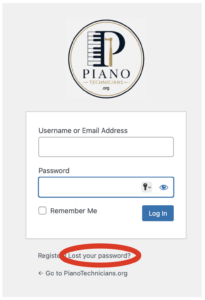
Just go to the login page and click the password recovery link (circled in red in the picture), and follow the steps.
Alternatively, here are the steps in detail:
Step 1: Navigate to the login page.
Step 2: Click the password recovery link (circled in red in the picture).
Step 3: Enter your email address on the resulting page, and press submit.
-
- This should be the email address from which you sent your request to be listed.
Step 4: You will receive an email at that address with a link to set a new password.
-
- The email is sent immediately, but may take a few minutes to navigate the internet and your email provider’s system.
- Note: you may need to check your spam folder.
Step 5: Click the link, and enter a strong password on the resulting page. The system will suggest a randomly generated strong password for you, but you are free to choose your own password.
Step 6: Now you can log in! Whenever you are logged in, a “toolbar” will appear at the top of each regular page, which gives you access to your account info:
-
- User Profile — general profile settings for all users
- Tech Profile — technician specific settings
NOTE: if you are claiming an existing profile, it should already have a service location set, as well as your phone number (which you can now change if you need to).